

Enable SMS Sign out reminders

REQUIRED ACCESS
Admin

DIFFICULTY
Intermediate

ESTIMATED TIME
5 minutes

APPLIES TO MODULES
Visitor, Contractor

PREREQUISITES
* Admin access to the dashboard.
* SMS credits or an active SMS plan.

SUMMARY
Send an automated SMS to visitors if they have not signed out by a certain time. This ensures accurate evacuation lists and visitor logs.

STEPS
1. Log in to the dashboard and go to Location Settings.
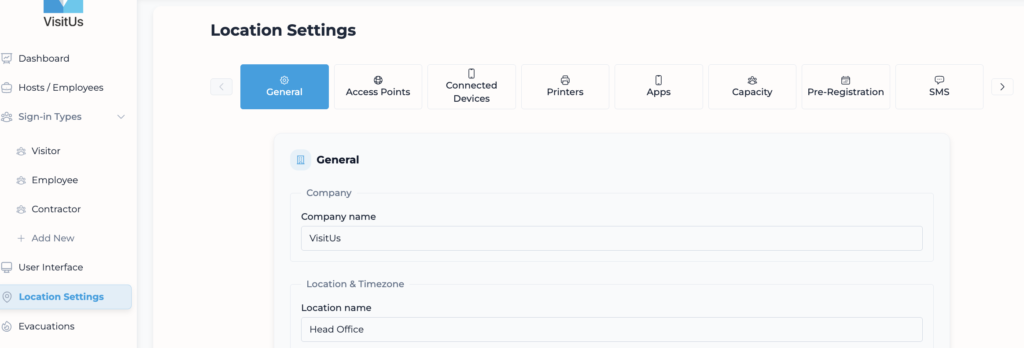
2. Click on the SMS tab.
3. Scroll down to the Defaults & reminders section.
4. Locate the Sign-out reminder dropdown.
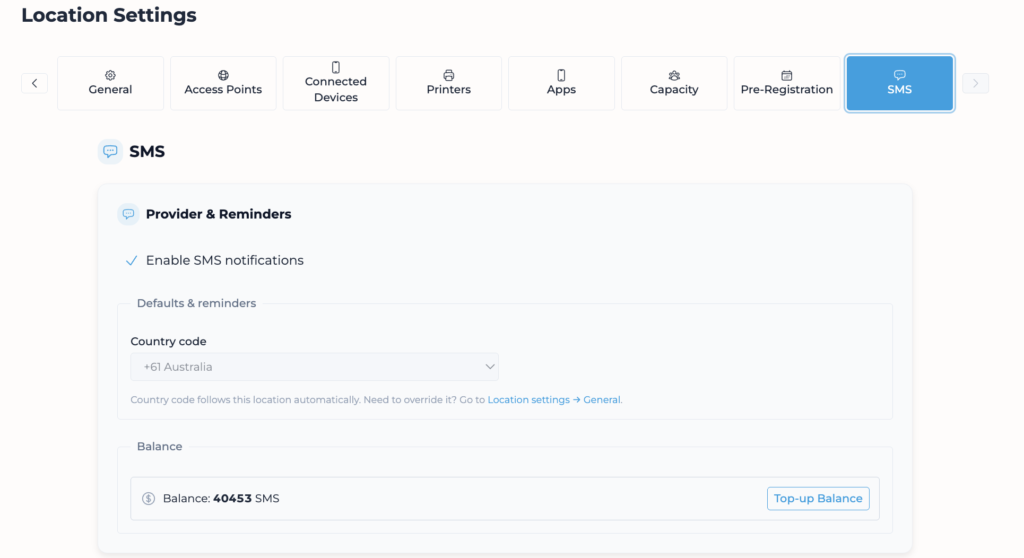
5. Select the time you want the reminder to be sent (e.g., “17:00” or “5:00 PM”).
6. Click Save to update changes.

VALIDATION CHECKLIST
* Verify that a visitor who is still signed in at the designated time receives an SMS.

TROUBLESHOOTING
* Problem: SMS not received. * Fix: Ensure the visitor provided a valid mobile number during sign-in. Check your SMS credit balance in Location Settings.