

Add hosts to the evacuation checklist

REQUIRED ACCESS
Admin

DIFFICULTY
Basic

ESTIMATED TIME
2 minutes

APPLIES TO MODULES
Evacuations, Hosts / Staff

PREREQUISITES
* Evacuation Mode is enabled for your plan.

SUMMARY
Ensure all staff members are accounted for during an emergency by automatically including them in the evacuation checklist, regardless of whether they have formally signed in.

STEPS
1. Log in to the dashboard and go to Evacuations.
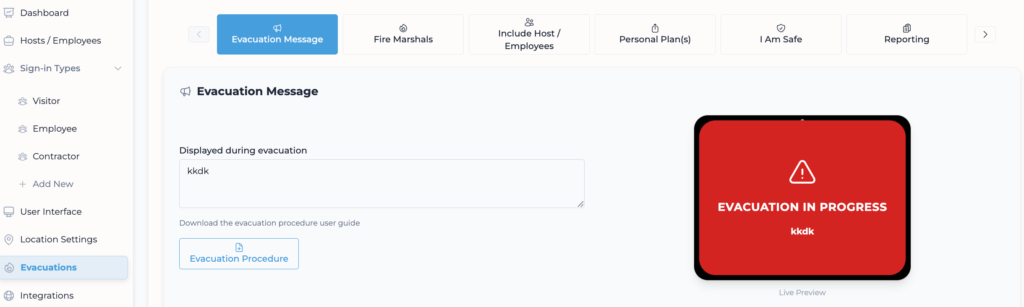
2. Click on the Include Host / Employees tab.
3. Locate the setting “Include Hosts/Employees who accessed the building in the evacuation checklist?”.
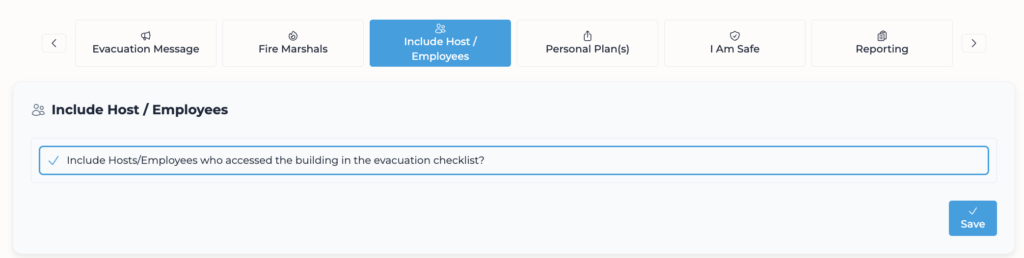
4. Toggle this setting On.
5. Click Save (if a save button is present, otherwise it may auto-save – check for confirmation).

VALIDATION CHECKLIST
* Run a drill evacuation. * Check if a host name appears on the Evacuation checklist.

TROUBLESHOOTING
* Problem: Hosts not receiving notifications. * Fix: Ensure hosts are actually added to the Hosts / Employees.