

Visitor Management System Pricing: What Are You Actually Paying For?
Visitor management system pricing can look simple at first. A provider displays a monthly figure, lists a few features and invites you to start a trial. The difficulty begins when you try to compare that price with another visitor management system.
One plan may include unlimited visitors but charge for each location. Another may include multiple locations but restrict monthly visitors, hosts or check ins. Some visitor management platforms publish every price, while others reserve their enterprise plans for a sales conversation. Hardware, badge printers, text messages, access control integrations and implementation may also sit outside the advertised subscription.
This guide explains the main visitor management software pricing models, compares several well known providers and shows how to calculate the likely visitor management system cost for your workplace.
Pricing and plan details were checked on 29 July 2026. Prices are shown in the currency published by each provider and may change. Always confirm current pricing with the vendor before purchasing.
Why visitor management system pricing is difficult to compare
Most visitor management systems perform the same basic job. They replace paper sign in sheets with a digital visitor log, notify employees when a visitor arrives and create a more consistent visitor experience. Beyond those core features, however, each management system packages its functions differently.
A basic plan may support visitor check in and host notifications but exclude badge printing, pre registration or evacuation reporting. Advanced security features such as ID scanning, watchlist screening, access rules and access control integrations are often reserved for enterprise plans. Other providers charge separately for desk booking, employee sign in, mobile device management or communication tools.
The advertised price therefore tells you very little unless you also know:
- Whether pricing is per location, kiosk, user, host or visitor
- Whether the plan includes unlimited visitors and unlimited users
- Which features are included in the entry level subscription
- Whether the price is monthly or billed annually
- What hardware is required for each self service kiosk
- Whether support, setup, training and integrations cost extra
The best visitor management systems are not necessarily those with the lowest starting price. They are the systems that make the total cost clear and allow an organisation to pay for the functions it will actually use.
The main visitor management pricing models
1. A free plan with usage limits
A free plan can suit very small offices that only need basic visitor registration. It may allow a limited number of monthly visitors, hosts or check ins. This is useful for testing a visitor management solution before committing to a paid subscription.
The weakness is that a free plan can become restrictive quickly. Check whether the platform stops accepting check ins after the limit, removes visitor records, restricts host notifications or requires an upgrade to add a second location.
2. Fixed feature tiers
Fixed tiers are the most common approach. A provider offers a basic plan, an essential plan, a professional or corporate plan and one or more enterprise plans. Each higher tier unlocks more advanced features.
This model is easy to understand, but it can force customers to upgrade for a single function. A business might need ID scanning but have no use for desk booking. It may want access control but not mobile device management. Once the required function appears in a higher tier, the customer pays for every other feature in that bundle as well.
3. Pricing per location
Per location pricing gives a predictable cost for one office. It can become expensive for organisations with multiple locations, particularly when smaller branches receive far fewer visitors than the head office.
When comparing multi location management, ask whether each site requires a full subscription. Also check whether one account can manage visitors, access rules, visitor types and reporting across the entire organisation.
4. Pricing by visitor volume
Usage pricing links the subscription to monthly visitors or completed check ins. It can be economical for a quiet workplace and expensive for a busy reception, event venue or shared facility. Seasonal businesses may also find their costs change throughout the year.
Look carefully at what happens when you exceed the allowance. Some systems charge an overage fee, while others move the account into a larger plan.
5. Modular pricing
Modular pricing separates the core visitor management system from optional functions. The customer starts with the basics, then adds modules for requirements such as contractor management, deliveries, access control, ID scanning or advanced security.
This structure can produce a more accurate visitor management system cost because the subscription reflects how the organisation will use the software. It also gives businesses room to add or remove modules as their requirements change.
6. Quote based enterprise pricing
Quote based enterprise plans are common where the provider needs to assess multiple locations, integrations, visitor volume, secure hosting, support and compliance requirements. This can make sense for enterprise businesses with complex deployments, but it makes early comparison more difficult.
Before accepting a quote, request an itemised breakdown of software, implementation, training, support, hardware and access control systems. This is the simplest way to expose hidden costs or hidden fees.
Visitor management system pricing comparison
The following examples show how differently visitor management platforms package similar capabilities.
Envoy Visitors
Envoy publishes its visitor management pricing online. Its free plan covers basic visitor needs and includes host notifications. Envoy currently lists a limit of 100 entries per month on one section of its pricing page, while another comparison section describes unlimited visitors, so buyers should confirm the current allowance directly.
Envoy lists its Premium visitor management plan at US$362 per location each month when billed annually. It includes an advanced visitor experience, customised branding, badge printing, visitor photos, analytics, legal documents and directory integrations. Enterprise pricing is customised and adds advanced security and control, including blocklist screening, access control integrations, guest WiFi integrations and ID scanning.
Envoy also sells other workplace products separately. Its pricing page lists desk booking at US$5 per bookable resource each month, emergency notifications at US$2 per user each month and digital screens at US$12 per device each month, excluding the platform fee. This illustrates why the total cost of a broader management system can be substantially higher than the visitor module alone.
Greetly
Greetly uses two published visitor management plans. Its Essential plan is US$99 per month and its Pro plan is US$159 per month, with both billed annually.
The Essential plan supports unlimited users, unlimited hosts and unlimited check ins. It also includes touchless sign in, host notifications through several channels, visitor photos, legal documents, emergency evacuations, pre registration and returning visitor sign in.
The Pro plan adds visitor badge printing, automated communication tools, government issued ID verification, driver licence scanning, Zapier integration, multiple kiosks and additional visitor log controls. The model is straightforward, although a customer needing only badge printing or ID scanning must move to the full Pro bundle.
The Receptionist for iPad
The Receptionist publishes annual pricing per site. Its Core plan is listed at US$630 per site each year, Enhanced at US$1,260 and Unlimited SMS Pro at US$1,890.
Core includes visitor management, a companion app, safety and evacuations, and badge printing. Enhanced adds a pre registration portal, ID scanning, spaces, time and attendance, onboarding and unlimited SMS. This structure makes the cost of each site easy to estimate, but organisations with multiple locations need to multiply the annual fee across those sites.
Sign In App
Sign In App combines visitor management with optional workplace products and hardware. Its pricing page lets buyers select AUD, USD, GBP, EUR or NZD and compare plans for business or education.
The platform includes visitor check in, staff sign in, host notifications, evacuation reporting, visitor badges, active directory integration through Microsoft Entra ID, Google Workspace integration, Teams, Slack, webhooks and an API. Add ons include desk booking and meeting room booking through Sign In App Spaces.
Hardware is another consideration. Sign In App advertises stands, RFID equipment and delivery charges separately. Buyers should include every kiosk, stand, badge printer and shipping charge when calculating the complete cost.
SwipedOn
SwipedOn has now been incorporated into the Sign In App product family, and its former pricing address redirects to Sign In App. Existing comparisons may still describe SwipedOn Starter, Business and Enterprise plans, but buyers should use the current Sign In App pricing page rather than relying on older figures.
This is also a useful reminder that visitor management software pricing can change after a merger, acquisition or product consolidation. Confirm whether existing functions, data retention and integrations remain available on the current plans.
Eptura Visitor, formerly Proxyclick
Proxyclick became Eptura Visitor in 2025. Eptura promotes the system as an enterprise visitor management solution with visitor screening, access control integrations and support for complex security requirements.
Eptura does not display a simple self service subscription price for Eptura Visitor. Prospective customers are directed towards a demonstration and custom quote. That approach may suit enterprise businesses requiring advanced security, compliance reporting and multi location management, but smaller organisations cannot calculate their likely cost without speaking to sales.
FacilityOS VisitorOS, formerly iLobby
FacilityOS provides plan comparisons but directs buyers to request a demonstration. VisitorOS is positioned for facilities with more demanding security, safety and compliance needs.
Its capabilities extend beyond visitor check in into emergency management, contractor compliance, logistics and physical identity and access management. That may offer a comprehensive solution for security teams, although it also means buyers should separate essential visitor management costs from broader facility functions when reviewing a quote.
VisitUs
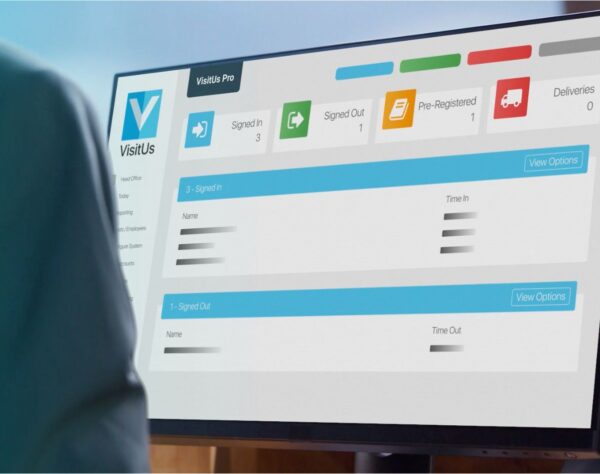
VisitUs takes a more flexible approach to visitor management system pricing. A free version provides a starting point for organisations with basic features and straightforward visitor check ins.
Businesses that need the operational essentials can move to the Essentials bundle. This includes host notifications, pre registration, returning visitors, reporting and evacuations. These functions cover the critical tasks most workplaces need to manage visitors safely and efficiently.
Other capabilities are available as add on modules that can be added or removed as requirements change. Rather than moving into a large fixed tier to obtain one advanced function, a customer can select the modules relevant to its workplace. This may include requirements such as visitor badge printing, contractor management, deliveries, access control or other specialist workflows.
The result is a visitor management solution that can grow without automatically forcing every customer into the same bundle. A small office can keep the system simple. A business managing multiple locations can build a more capable configuration. An enterprise can introduce advanced security without paying for unrelated features.
What determines visitor management system cost?
Number of locations and kiosks
A subscription advertised per location can appear inexpensive until it is deployed across ten, fifty or one hundred sites. Ask whether multi location management is included and whether smaller sites can use a lighter plan.
Also determine how many kiosks are allowed at each site. A large reception may need several tablets for simultaneous visitor check in. Some plans include one self service kiosk and charge for each additional device.
Visitor and host limits
Some plans include unlimited visitors, while others price according to monthly visitors or check ins. The same distinction applies to employees. A provider may advertise unlimited users but limit the number of hosts in the directory.
Look for clear statements such as “includes unlimited visitors”, “supports unlimited users” or “unlimited hosts”. Then verify whether fair use rules or messaging limits still apply.
Badge printing and hardware
Badge printing can improve security by making authorised visitors easy to identify. The software feature may be included, but the badge printers, labels, tablet stands and replacement supplies are normally separate purchases.
Ask which badge printers are supported, whether the system can print visitor badges automatically and whether each kiosk requires its own printer. Hardware can become one of the largest upfront costs in a multi site rollout.
ID scanning and visitor screening
ID scanning is often an enterprise feature. Providers may charge by scan volume or include a set allowance. Confirm which identity documents are supported and whether photo capture, document storage or external screening services create extra charges.
Organisations that screen visitors against internal watchlists or other sources should also confirm where visitor data is stored, how long visitor records are retained and who can access the results.
Access control integrations
Connecting visitor management with access control systems can issue temporary credentials when a visitor arrives and apply access rules automatically. This improves security and reduces work for reception staff and security personnel.
However, access control integrations are frequently limited to advanced plans. There may also be setup fees from the visitor management provider, the access control vendor or the integration partner.
Notifications and communication tools
Email host notifications are usually included. SMS, Teams, Slack, two way messaging and automated visitor communications may be limited or charged separately. Ask whether the subscription includes unlimited notifications or a monthly message allowance.
Security, compliance and hosting
Advanced security can include single sign on, active directory integration, audit logs, access roles, secure hosting, visitor data controls and compliance reporting. These capabilities are particularly important for government, healthcare, manufacturing and enterprise businesses.
A lower priced basic plan may not meet the organisation’s technical or regulatory requirements. In that case, compare the exact enterprise features rather than the advertised entry price.
Common hidden costs in visitor management software
Hidden costs are not always deliberate hidden fees. They often arise because the buyer focuses on the software subscription and overlooks the complete deployment.
Before choosing a management system, check for:
- Tablet devices, stands and wall mounts
- Badge printers, labels and replacement supplies
- Setup, implementation and staff training
- SMS and communication charges
- Charges for extra locations, kiosks or administrators
- API, directory and access control integrations
- ID scanning or visitor screening allowances
- Data migration and custom reporting
- Premium support and service agreements
- Annual commitments and early cancellation terms
A plan that is billed annually may display its monthly equivalent in large text. Confirm the actual amount charged, contract length and renewal conditions.
How to choose the right visitor management plan
Start with your visitor journey
Write down what happens from the moment a visitor arrives until they leave. Do they use QR code check in, a tablet or a staffed desk? Must they accept legal documents? Is photo capture required? Does the host need an email, SMS or Teams alert? Should the visitor receive a printed badge or temporary access credential?
This gives you a practical list of key features instead of a generic wish list.
Separate essential and optional requirements
Most organisations need reliable visitor registration, host notifications, a current visitor log, reporting and support during evacuations. Other advanced features may only be relevant to certain visitor types, locations or security teams.
Separating core features from optional modules prevents one specialist requirement from pushing the entire organisation into an oversized corporate plan.
Calculate the cost across three years
Compare the likely subscription, hardware and setup costs over three years. Include expected growth in locations, visitors and integrations. A free plan may be suitable now but expensive to replace later. A larger platform may cost more initially but reduce administration as the organisation expands.
Test the complete visitor experience
A visitor management system should create a smoother visitor experience, not simply digitise a slow process. During a trial, test returning visitors, pre registration, touchless sign in, QR code check in, badge printing and host notifications.
Ask several employees to manage visitors and retrieve visitor information. Include reception, IT and security personnel in the trial so the system is assessed from more than one perspective.
Is the cheapest visitor management system the best choice?
Not usually. A low starting price is valuable only when the basic plan contains the functions the business needs. If every useful capability requires an upgrade, the final visitor management system cost may be much higher than expected.
The opposite can also be true. A comprehensive solution may include desk booking, deliveries, employee scheduling, mobile device management and advanced security features that a small office will never use. Paying for unused software does not create additional value.
A better approach is to choose a visitor management platform with a sensible foundation and room to add functions as they become necessary. Flexible modules make the relationship between cost and value easier to see.
A more flexible way to buy visitor management software
Traditional software tiers assume that every organisation develops in the same order. In practice, one business may need visitor badge printing first, another may prioritise access control and a third may require contractor workflows across multiple locations.
VisitUs combines a free version, an Essentials bundle and optional modules. The Essentials bundle covers notifications, pre registration, returning visitors, reporting and evacuations. Additional functions can then be selected according to the workplace rather than unlocked through a much larger fixed plan.
This structure gives very small offices an accessible starting point, helps growing businesses avoid unnecessary features and allows enterprise businesses to build a more tailored management system. It also makes it easier to remove a module when a requirement changes.
Questions to ask every visitor management provider
- Is the subscription priced per site, kiosk, user or visitor?
- Does the plan include unlimited visitors, unlimited users and unlimited hosts?
- Which features require an enterprise or corporate plan?
- Are pre registration, evacuations and reporting included?
- What hardware is required for visitor check in and badge printing?
- Are SMS, ID scanning and access control integrations charged separately?
- Can modules be added or removed during the contract?
- Are setup, support, training and data migration included?
- How is visitor information protected and where is it hosted?
- What will the system cost across all locations over three years?
Final thoughts on visitor management system pricing
There is no single pricing model that suits every workplace. A free plan may be enough for a quiet office. Fixed tiers can work when their feature bundles closely match the buyer’s requirements. Quote based enterprise plans may be appropriate where advanced security, compliance and access control are central to the deployment.
The important point is to compare more than the headline price. Review visitor limits, multiple locations, hardware, badge printing, host notifications, integrations, support and contract terms. Then calculate what you will pay for the features you will actually use.
A flexible visitor management solution gives an organisation more control. By starting with the essentials and adding modules when they become relevant, businesses can improve security, deliver a smoother visitor experience and avoid paying for a long list of functions they do not need.