

Ask a question on sign-out
REQUIRED ACCESSAdmin DIFFICULTYIntermediate ESTIMATED TIME3 minutes APPLIES TO MODULESiPad App PREREQUISITES• You are logged in to the VisitUs dashboard. SUMMARY Prompt visitors or employees with a question when they sign out, key for data collection or safety checks. STEPS 1. Go to Sign-in Types in the left sidebar. 2. Select the Visitor (or relevant) sign-in type. 3.
Add hosts to the evacuation checklist

REQUIRED ACCESS
Admin

DIFFICULTY
Basic

ESTIMATED TIME
2 minutes

APPLIES TO MODULES
Evacuations, Hosts / Staff

PREREQUISITES
* Evacuation Mode is enabled for your plan.

SUMMARY
Ensure all staff members are accounted for during an emergency by automatically including them in the evacuation checklist, regardless of whether they have formally signed in.

STEPS
1. Log in to the dashboard and go to Evacuations.
<!--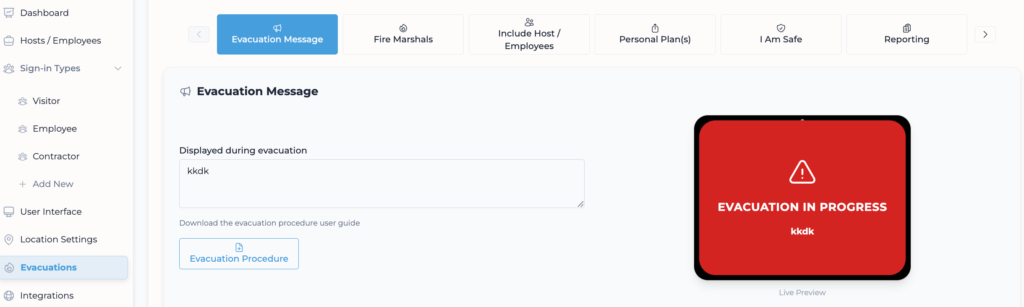
2. Click on the Include Host / Employees tab.
<!--3. Locate the setting "Include Hosts/Employees who accessed the building in the evacuation checklist?".
<!--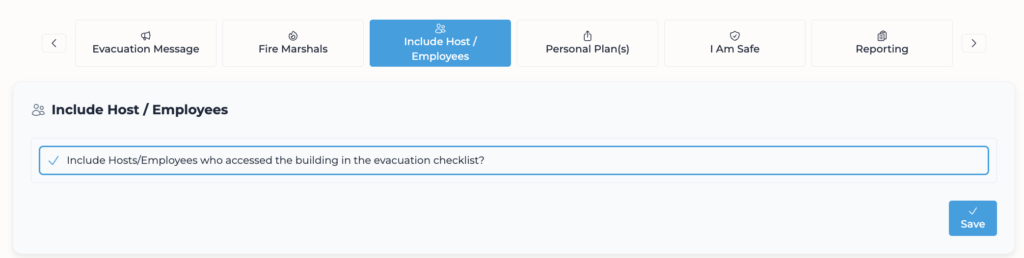
4. Toggle this setting On.
<!--5. Click Save (if a save button is present, otherwise it may auto-save - check for confirmation).
<!--
VALIDATION CHECKLIST
* Run a drill evacuation. * Check if a host name appears on the Evacuation checklist.

TROUBLESHOOTING
* Problem: Hosts not receiving notifications. * Fix: Ensure hosts are actually added to the Hosts / Employees.
Add or remove your organisations logo
REQUIRED ACCESSAdmin DIFFICULTYBasic ESTIMATED TIME1 minute APPLIES TO MODULESiPad App PREREQUISITES• You are logged in to the VisitUs dashboard. SUMMARY Toggle whether your company logo is displayed on the main menu of the iPad app. STEPS 1. Go to User Interface in the left sidebar. 2. Select the Branding tab. 3. Click on the Logo sub-tab. 4.
Update a host’s email address
REQUIRED ACCESSAdmin, Host DIFFICULTYBasic ESTIMATED TIME1 minute APPLIES TO MODULESDashboard, Hosts PREREQUISITESYou are logged in to the VisitUs dashboard.You have the necessary permissions to manage hosts. SUMMARY This guide explains how to update the email address for a host or staff member in the VisitUs dashboard. STEPS 1. Go to Hosts in the left navigation sidebar. 2. Locate the
Add an induction to your sign-in process
REQUIRED ACCESSAdmin DIFFICULTYIntermediate ESTIMATED TIME5 minutes APPLIES TO MODULESiPad App PREREQUISITES• You are logged in to the VisitUs dashboard. SUMMARY Require visitors to complete a health and safety induction or view a declaration before signing in. STEPS 1. Go to Sign-in Types in the left sidebar. 2. Select the Visitor sign-in type (or relevant sign-in type). 3.
Add a PDF to your sign-in process
REQUIRED ACCESSAdmin DIFFICULTYIntermediate ESTIMATED TIME5 minutes APPLIES TO MODULESiPad App PREREQUISITES• You are logged in to the VisitUs dashboard.• You have a PDF document (5 pages max recommended). SUMMARY Display a PDF document (such as an NDA or site access agreement) that visitors must view and agree to before signing in. STEPS 1. Go to Sign-in Types
Add a new sign in type
REQUIRED ACCESSAdmin DIFFICULTYBasic ESTIMATED TIME2 minutes APPLIES TO MODULESDashboard, iPad App PREREQUISITES• You are logged in to the VisitUs dashboard. SUMMARY Create a new visitor or employee sign-in type (e.g., Contractor, Volunteer, Staff). STEPS 1. Go to Go to Sign-in Types in the left navigation sidebar. 2. Expand the Sign-in Types menu. 3. Click on the +
Add a new location/site
REQUIRED ACCESSAdmin DIFFICULTYBasic ESTIMATED TIME1 minute APPLIES TO MODULESDashboard PREREQUISITESYou are logged in to the VisitUs dashboard. SUMMARY How to create a new location in your VisitUs dashboard. STEPS 1. Log in to the VisitUs dashboard. 2. In the top navigation bar, locate the Location dropdown (top left). 3. Click the + (Plus) button immediately to the right of the
Adding hosts
REQUIRED ACCESSAdmin DIFFICULTYBasic ESTIMATED TIME2 minutes APPLIES TO MODULESDashboard, Hosts PREREQUISITESYou are logged in to the VisitUs dashboard. SUMMARY There are 3 ways to add a host into the VisitUs Reception system: Manual entry, CSV upload, or Microsoft Entra ID sync. STEPS 1. Go to Hosts / Employees in the left navigation sidebar. 2. Click the Add Host button
Add a host manually
REQUIRED ACCESSAdmin DIFFICULTYBasic ESTIMATED TIME2 minutes APPLIES TO MODULESDashboard, iPad App PREREQUISITES• You are logged in to the VisitUs dashboard. SUMMARY Manually add a single host or employee to the system. STEPS 1. Go to Hosts / Employees in the sidebar. 2. Click on the Add Host button in the top right corner. 3. Ensure the Manual